AllThingsCX website preview
AllThingsCX — Elevate. Connect. Deliver.

AudioCodes × AllThingsCX

Connect your voice.
Extend the experience.

Bring telephony, collaboration and customer engagement together. AllThingsCX helps you assess AudioCodes for voice connectivity, Microsoft Teams calling, Voca CIC contact centres and Live Hub voice AI.

Your AllThingsCX team · Advice, coordination and ongoing support.

Connect what you have.
Design for where you’re going.

Modernising voice often means working across existing carriers, systems and new cloud services. We help you map those dependencies and choose the AudioCodes capabilities that fit your plan.

Voca CIC in action

Customer engagement within Teams.

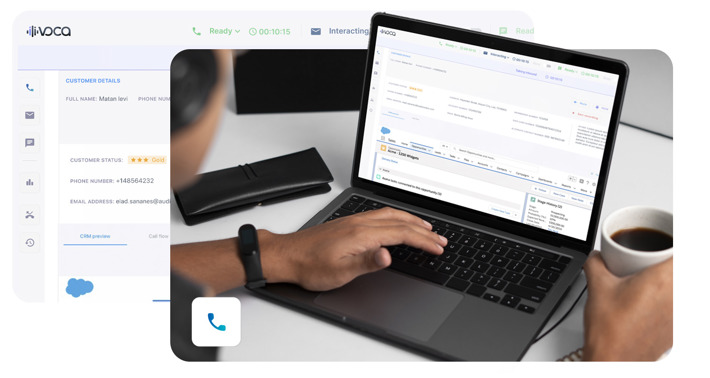
See how the contact centre experience fits into the collaboration environment. We help you assess the channels, routing and integration you need.

AudioCodes Voca CIC Microsoft Teams contact centre product view
Voca CIC · Microsoft Teams contact centre · Official product view ↗
Voice connectivity · Mediant SBCs

Bridge the voice environment.

AudioCodes session border controllers support secure voice interconnection and interoperability, including Microsoft Teams Direct Routing scenarios.

  • Connect compatible telephony and cloud services.
  • Assess deployment and resilience requirements.
  • Plan around carrier and existing system dependencies.

Customer engagement · Voca CIC

Bring customer service into Teams.

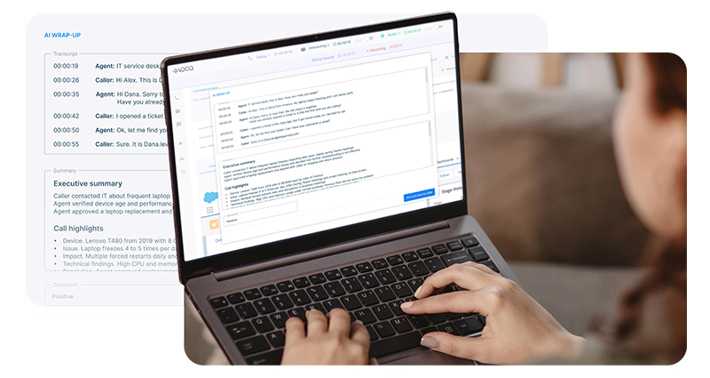
Voca CIC is AudioCodes’ omnichannel contact centre for Microsoft Teams, with conversational AI and tools for managing customer interactions.

  • Route and manage customer conversations.
  • Explore transcription, summaries and sentiment.
  • Assess reporting and CRM integration requirements.

AudioCodes Live Hub

Bring AI into the conversation.

AudioCodes Live Hub AI agent builder promotional visual
AudioCodes Live Hub · Official product view ↗

Live Hub is a cloud platform for building and deploying voice AI agents and connecting them to business phone systems. Build an agent in Live Hub or connect your chosen conversational AI platform.

Explore Live Hub ↗
01 · Connect

Connect your calls.

Bring telephony and conversational AI together through one voice platform.

02 · Automate

Build useful voice agents.

Support routine enquiries and conversational call routing, with handover to a person when needed.

03 · Plan

Start with a clear use case.

AllThingsCX helps define the caller journey, integrations and handover requirements before rollout.

Voice technology with a clear role

Connect. Engage. Operate.

01 · Connect

Build the right voice path.

AudioCodes offers SBCs and Teams voice solutions. We help assess the connections, number plans and interoperability your environment needs.

02 · Engage

Shape the service journey.

Voca CIC brings contact centre capabilities into Teams. We help you assess routing, channels and the experience for customers and agents.

03 · Operate

Plan beyond deployment.

We help define service responsibilities, monitoring and support arrangements for your chosen AudioCodes products.

Features, Microsoft licensing, integrations and service availability depend on the selected products and deployment. We’ll confirm compatibility and scope before recommending a design.

Agent insights

Turn interactions into understanding.

Explore Voca’s insight tools with the people responsible for quality, coaching and customer experience.

AudioCodes Voca CIC agent insights product view
Voca CIC · Agent insights · Official product view ↗

Your AllThingsCX team

Bring the moving parts into one plan.

AllThingsCX helps you translate voice and customer experience requirements into a coordinated project. We focus on the dependencies, the transition and the people who will operate the service.

Discuss your requirements ↗
01 / Discover

Map the environment.

Review platforms, carriers, numbers, sites and the user or customer journeys involved.

02 / Design

Resolve the dependencies.

Assess interoperability, licensing and routing requirements with the relevant technical parties.

03 / Implement

Coordinate a controlled change.

Agree configuration, migration, testing and handover responsibilities before rollout.

04 / Support

Make ownership clear.

Establish the support route, administrator guidance and review process for your chosen service.

A clearer starting point

Questions worth asking.

Is AudioCodes only for Microsoft Teams?

No. Its voice connectivity portfolio supports a range of enterprise and service-provider environments. This preview highlights Teams and customer engagement alongside SBC connectivity.

What does an SBC do?

A session border controller sits at the boundary between voice networks, helping manage security and interoperability. The required model and configuration depend on the connected services.

Can we retain our carrier or existing systems?

That may be possible, but it needs assessment. We’ll review carrier services, interfaces, licensing and migration requirements before confirming a path.

Let’s make the next step clear

Talk to us about AudioCodes.

Tell AllThingsCX about your team, your customers and what needs to change. We’ll help you shape a practical way forward.

Discuss AudioCodes ↗